
How to Build Complex Software Fast With AI You Can Actually See
The teams winning with AI aren't the ones prompting hardest — they're the ones who can see what AI builds. Here's the architecture-first way to ship complex products fast and safely.
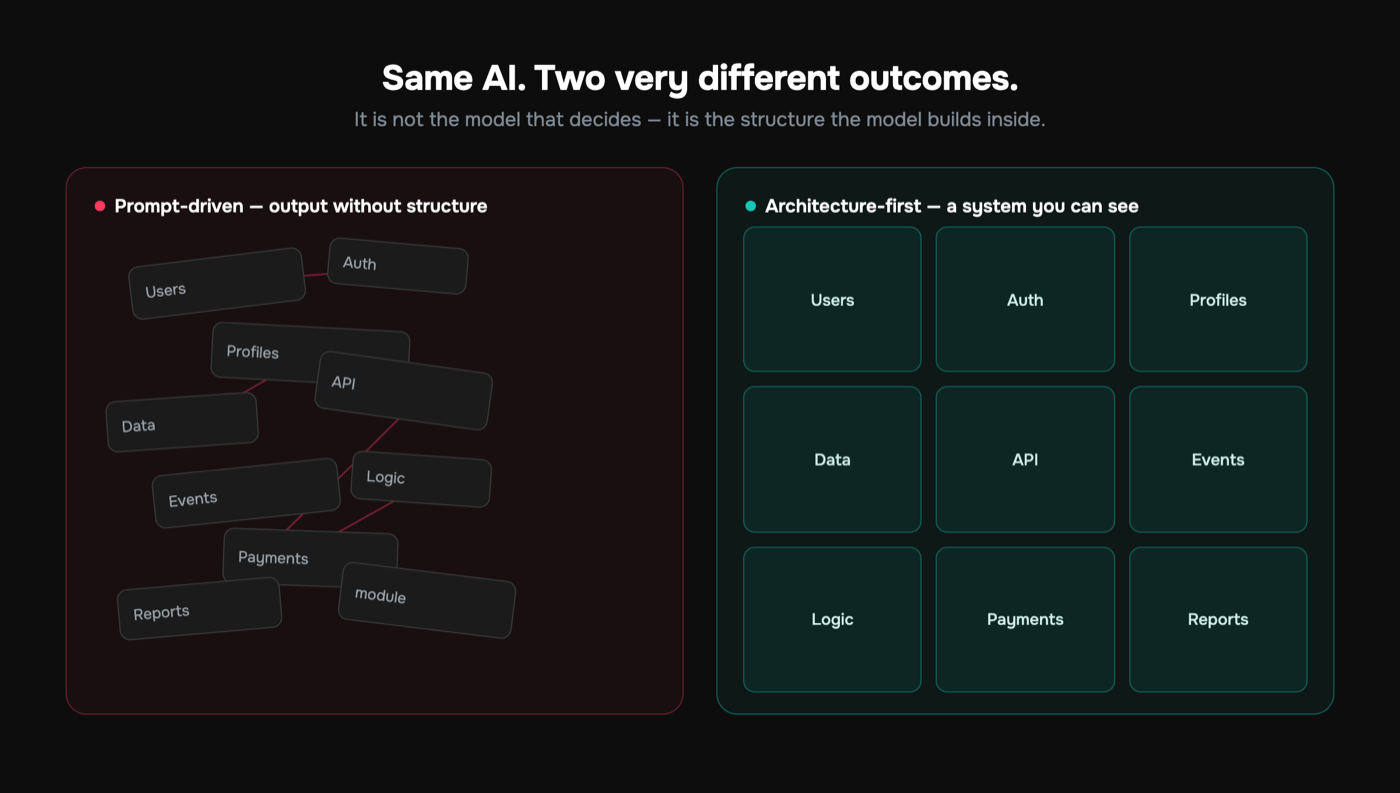
You can build complex software fast with AI, but only if you can see what the AI is actually building. The teams shipping real systems aren't typing better prompts. They're working inside a visual architecture where every module, data flow, and API is a thing you can point at, inspect, and validate. The AI generates structured objects into that picture. You review the picture, not a wall of diffs you'll never finish reading.
The default workflow does the opposite. You describe a feature in prose, the model emits files, and the only record of the system's design lives in a chat history that's gone by next week. Day one feels fast. By week three you're debugging a structure no human ever drew, two endpoints disagree about the same record, and nobody can answer "what does this app actually do" without grepping. That isn't AI development. It's undocumented liability, accumulating at machine speed.
This guide is about the other path. Visual AI development, where the architecture is the source of truth, the AI fills it in, and you keep control because you can literally see the system. We'll cover what "AI you can see" means in practice, why it lets small teams build genuinely complex software fast, how it changes the economics of generation, and where it fits next to Cursor, Copilot, Lovable, v0, Replit Agent, and Bubble.
Why "Fast" Usually Turns Into "Stuck"
Speed without visibility is a loan. The interest comes due exactly when the system gets interesting: multiple users, real money, more than five moving parts.
Here's the failure mode almost every team hits with prompt-first AI development. The first 2,000 lines fly out. Then it unravels:
- The model starts contradicting itself because the system no longer fits in its context window.
- A new feature silently breaks an old one because nothing enforced the contract between them.
- You can't tell a teammate "here's how it works" — the design was never written down anywhere durable.
- Onboarding a second engineer means a week of archaeology instead of an hour of reading.
The uncomfortable part: this isn't a prompting skill issue. It's structural. When the architecture exists only implicitly, in the model's head during one session and nowhere after, every prompt is a fresh negotiation with a system that has no memory of its own shape.
You cannot control what you cannot inspect. Most AI coding workflows fail not because the AI is bad at code, but because nobody can see the system the code is supposed to add up to.
And this is measurable, not just anecdotal. Research from McKinsey on generative AI in software development found that AI tools deliver real productivity gains only when teams pair them with clear structure and rigorous review. Without that scaffolding, the apparent speedup erodes as developers spend more time untangling and reworking generated code. That's the visible fingerprint of generation with nowhere to generate into: more code, less coherence.
What "AI You Can Actually See" Means
"See" isn't a metaphor here. The system has a representation that is visual, explicit, and authoritative. Not a diagram you drew once and forgot, but the actual object the AI builds against.
Concretely, visual architecture means you model the things that matter before generation:
- Modules — the bounded pieces of your product (auth, billing, notifications) and what each owns.
- Data flows — how a value moves from one place to another, e.g. checkout to entitlement to access.
- Entities and their shapes — the
User, theSubscription, theInvoice, with typed fields. - APIs — the surface each module exposes and what callers can expect.
- Business logic — the rules that aren't optional (a refund must reverse the entitlement).
Once that exists as a real model, the AI doesn't invent structure. It generates the implementation for a node you've already defined, knowing exactly what its neighbors expect. This is the core of AI-native development: architecture first, generation second.
What separates this from "draw a diagram and then go vibe-code" is enforcement. A picture the code can drift away from is decoration. A picture the code is generated from, and validated against, is an architecture. That's the line GitMir is built on: the visual model isn't documentation that rots, it's the thing the AI builds inside.
A quick mental model
Think about how a strong senior engineer approaches an unfamiliar codebase. They don't start typing. They map what objects exist, how data moves, where the boundaries are, what contracts hold between components. Typing is the last 20%. Visual AI development hands the AI that same scaffolding, so its output lands in the right place with the right interfaces instead of being conjured on the fly and reconciled later.
How Visual Architecture Lets You Build Complex Software Fast
The promise — build complex software fast with AI — only holds when complexity is contained. Visual architecture contains it in four specific ways.
1. The AI generates into a known slot, not a blank canvas. Ask for "the password reset flow" and the model already knows the User entity, the email module's API, and the session rules. It's filling a hole with known edges, not redesigning the world. Fewer degrees of freedom, fewer wrong guesses.
2. Reusable components stop the copy-paste sprawl. A validated input component, an auth guard, a paginated list — define it once, reuse it everywhere, and the duplication problem researchers have measured in AI-assisted codebases simply doesn't accumulate. That's the difference between a system and a pile of similar-looking files.
3. Validation happens before deploy, not in production. Because the architecture is typed and explicit, generated objects get checked against it automatically. Does this endpoint return the shape its consumers expect? Does this flow respect the business rule? All of it before anything ships. We go deep on this in how to validate AI-generated code, but the headline is that "looks right" gets replaced by "verified against the model."
4. The system stays legible as it grows. New person, new feature, six months later — the architecture is still right there, visual and current, because it's the thing being built from. The codebase can't silently diverge from a model that generates it. That same property means architecture documents itself automatically instead of requiring a doc-writing sprint nobody wants.
Here's the counterintuitive part. Architecture-first is slower for the first hour and dramatically faster for the next three months. You pay a small upfront cost to model the system, and in exchange the AI never again guesses about parts it can't currently see. Complexity that would compound into chaos compounds into structure instead.
The Token Economics Nobody Talks About
Underneath all of this sits a cost story that prompt-first workflows pay over and over.
When the system is implicit, every meaningful prompt forces the AI to re-derive context: re-read files, re-infer the data model, re-reason about how things connect, then generate. You're paying for the model to rediscover your architecture on each request, because the architecture lives nowhere it can cheaply load.
When the system is explicitly modeled, the AI needs only the relevant slice — this entity, this flow, these contracts — to produce a correct object. The expensive re-derivation disappears.
| Prompt-first (implicit structure) | Architecture-first (visual model) | |
|---|---|---|
| What the AI loads per request | Broad file context, re-inferred each time | The relevant modeled slice |
| Where the design lives | In the chat, then gone | In the durable visual architecture |
| Validation | Eyeball the output | Checked against the model pre-deploy |
| Duplication over time | Grows (copy-paste) | Contained (reusable components) |
| Cost trend as system grows | Rises (more context to re-read) | Stays flat-ish (scoped generation) |
In GitMir's approach, scoping generation to the modeled architecture works out to roughly 15x fewer LLM tokens than ad-hoc prompting for equivalent work. That's not a rounding-error optimization. At team scale it's the difference between AI development being a line item and being a budget problem. To turn that into your actual numbers, the ROI calculator does the math on tokens and engineering hours together, and we break down the mechanics in how to reduce AI token costs.
The hidden cost of vibe coding isn't the wrong code you catch. It's the right code you pay to regenerate context for, again and again, because the system has no memory of itself.
A Realistic Scenario: Three Founders, One Billing System
Abstract claims are cheap. Here's a concrete one.
A three-person team is building a B2B SaaS. They need org-level accounts, seat-based billing, role permissions, and usage metering. With a prompt-first tool, week one looks magical: a working dashboard, a checkout page, login. Then it turns:
- The billing page and the entitlement check were generated in different sessions. They disagree about what "active" means. A churned customer keeps access for a week. Nobody notices until support does.
- A founder adds usage metering. The new code reads a
planfield that the billing flow callstier. Silent mismatch, wrong invoices. - The second engineer joins and spends four days reconstructing the data model from scattered files because it was never written down.
Now run the same team architecture-first. They model Organization, Seat, Subscription, and UsageEvent once, define the flow from checkout to entitlement to access, and pin the rule that a lapsed subscription revokes access. The AI generates each piece against those shared definitions:
- "Active" is defined in exactly one place, so billing and access can't drift.
- The metering feature reads the real field, because there's one canonical entity rather than two prose descriptions.
- The new engineer reads the visual architecture in an hour and ships on day one — the same reason teams using this approach onboard engineers faster.
Same AI. Same three people. The whole difference is whether the system was something you could see and the AI could build against, or something that only existed as a memory in a chat window.
Where This Sits Next to the Tools You Know
None of this means the popular tools are bad. It means they solve a different layer, and being fair about that matters more than dunking on them.
Cursor and GitHub Copilot are excellent at the editing layer: autocomplete, in-file refactors, "explain this function." They're force multipliers on code you're already navigating. What they don't give you is a persistent, enforced model of the whole system. You still hold the architecture in your head, and the AI reconstructs context from files each time. Pairing in-editor AI with an explicit architecture is complementary, not competitive — we compare the trade-offs on the comparison page.
Lovable, v0, and Replit Agent are genuinely impressive at going from a description to a running app fast. The constraint is the one this whole article is about: the structure stays implicit, so control gets harder precisely as the project gets more valuable. They're outstanding for prototypes and first drafts. The question is what happens when the prototype has to become a product.
Bubble and classic no-code give you a visual builder, which is a real advantage for visibility. But you're inside a closed runtime and a fixed component model, trading code-level control and portability for the convenience. Visual architecture over real, generated code is a different bet: the picture governs actual code you own.
Here's the honest framing:
- Want the fastest possible weekend prototype? Vibe-code it with v0, Lovable, or Replit Agent.
- Living in your editor on an existing codebase? Cursor and Copilot are hard to beat.
- Building something complex that has to stay correct and legible as it grows, with a small team? You want the architecture to be visible and the AI to build inside it.
The mistake is using a prototype tool to build a system, then being surprised when the prototype's lack of structure becomes the system's defining problem. See scaling a vibe-coded prototype to production for what that transition actually costs.
How to Adopt This Without Betting the Company
You don't migrate everything at once. You prove it on one bounded thing.
- Pick one subsystem where correctness matters. Billing, auth, a data pipeline — somewhere a hallucinated field or a dropped check is an incident, not a vibe. That's where visible architecture earns its keep fastest.
- Model it before you generate. Define the entities, the flows, the API surface, and the non-negotiable rules. This is the hour that feels slow. Spend it.
- Generate into the model and let validation run. Treat "looks fine" as a red flag, not a green light. The whole point is that output is checked against the architecture before deploy.
- Compare honestly. How many tokens, how many review cycles, how many "wait, which field is canonical" moments versus the prompt-first version? Be skeptical. The numbers should be obvious, or the approach isn't for that subsystem.
- Expand to the next bounded piece. Reuse the components you've already built. The second subsystem is faster than the first because the library is growing.
Signs you needed this yesterday
If several of these are true, implicit structure is already costing you more than you think — the full checklist is in signs your AI codebase is becoming unmaintainable:
- No one can explain the data model without opening files.
- "Where is X defined?" returns more than one answer.
- Onboarding takes days of reading code, not hours of reading architecture.
- The same logic appears in three slightly different forms.
- You're afraid to change things because you can't see what depends on what.
The Real Shift: From Prompting to Designing
Step back from the tooling and the shift is simple. The unit of work stops being "the prompt" and becomes "the system model." The AI stops being a writer you coax and becomes a very fast, very literal engineer who builds exactly the thing you designed. No more, no less.
That reframing is what makes complex software buildable fast by a small team. Not faster typing. Not cleverer prompts. A durable, visible structure that the AI extends and validation protects, so the speed you get on day one is still there on day ninety instead of buried under undocumented mistakes.
The teams that win the next few years won't have the best prompts. They'll treat the architecture as the asset and the AI as the engine that fills it in — and they'll be able to see the whole thing while they do it.
Complexity isn't the enemy. Invisible complexity is. The moment you can see your system, and the AI builds inside what you see, building fast and staying in control stop being a trade-off.
Next Step
If you've felt the day-three slowdown, the magic prototype turning into a structure nobody can read, the fix isn't a better prompt. It's making the system visible and letting the AI build inside it.
Start with the ROI calculator to turn the token and engineering-hour story above into your team's real numbers. Then see the product to watch architecture-first generation in motion, or compare your current stack honestly on the comparison page. If you're weighing it against a specific tool, start free and see what it costs to stop paying the invisible tax.
More on this, with the numbers behind it
What business logic is, and where it lives →Features, rules, customer paths and how they connect — why nothing a team already owns holds them in one place, and what that costs.Every tool in this market, side by side →What each one is built for, and the line between assembling context and holding it.What your AI actually costs →Your engineers, your loaded cost, your monthly AI bill — counted on your own numbers, not ours.Ask a published model your own question →A real product, read in full. Ask it what a change reaches and check the answer against the source it came from.GitMir Intelligence →Ask what a change reaches, what a rule holds and which customer path meets it — with the part of the product each answer came from.Put a number on your own workflow
Bring us the recurring workflow where AI still needs expensive people to supervise, review and correct. We baseline what it costs and put the target in writing before we build. Or connect a repository and see it on your own code first — 10,000 credits free, no card.
Build My Business Case → Start free →Frequently asked questions
How can you build complex software fast with AI without losing control?
Build inside a visual architecture instead of prompting into a blank canvas. You model the system first — modules, data flows, entities, APIs, business logic — and the AI generates structured objects into that defined structure, validated before deploy. You keep speed because the AI fills known slots, and control because you can see and inspect the whole system as it grows.
What does "AI you can see" actually mean?
It means the system has a visual, explicit, authoritative model — not a diagram that rots, but the actual object the AI builds against. Modules, data flows, typed entities, APIs, and business rules exist as real things you can point at, review, and validate. Generated code can't silently drift from a model it's both generated from and checked against.
Is visual AI development the same as no-code tools like Bubble?
No. No-code builders like Bubble give you visibility but lock you into a closed runtime and fixed component model, trading code-level control and portability for convenience. Visual architecture governs real, generated code that you own. You get the legibility of a visual builder over an open, validated, AI-generated codebase rather than inside a proprietary platform.
How is this different from Cursor, Copilot, Lovable, or v0?
Cursor and Copilot excel at in-editor editing but keep the architecture in your head, reconstructing context from files each prompt. Lovable, v0, and Replit Agent generate running apps fast but leave structure implicit, so control degrades as projects grow. The visual-architecture approach keeps an explicit, enforced model that constrains generation and validates output before deploy.
Why does building inside an architecture use fewer tokens?
Because the AI loads only the relevant modeled slice — this entity, this flow, these contracts — instead of re-reading the codebase and re-inferring the design on every request. That eliminates the expensive context re-derivation prompt-first workflows pay repeatedly. In GitMir's approach this works out to roughly 15x fewer LLM tokens than ad-hoc prompting for equivalent work.
Where should a small team start adopting this?
Start with one bounded subsystem where correctness matters — billing, auth, or a data pipeline — rather than migrating everything at once. Model its entities, flows, and rules before generating, run validation against that model, then compare token count and review cycles against the prompt-first version. Expand to the next subsystem once the component library starts paying off.

Related articles
How to Migrate Legacy Software with AI (Without a Blind Rewrite)
Most legacy migrations fail because nobody fully understands the system being moved. The fix isn't translating code — it's capturing the product as a structured model first, so AI can re-platform and refactor it with real context.
The Laptop Did Not Just Change. The AI Development Model Changed
NVIDIA's Spark and the AI PC signal a shift: AI agents are moving onto the machine — always-on, local, next to your code. Why that makes architectural visibility non-negotiable.
What Is Vibe Coding? (And How to Do It Without Breaking Production)
Vibe coding means building software by prompting AI instead of writing code by hand. It's fast — but without structure it ships bugs, lost context and hidden architecture. Here's how to keep the speed and the control.