
What Is an AI Coding Agent? (And Where It Helps vs Hurts)
An AI coding agent plans and executes multi-step coding tasks on its own. Powerful — but without structure and validation, autonomy amplifies mistakes. Here's how to use agents safely.
An AI coding agent is software that takes a goal in natural language and works toward it semi-autonomously: reading your codebase, writing and editing files, running commands, watching what happens, and looping until it decides the task is done. The keyword is agent. A plain assistant suggests the next line. An agent picks a plan, runs several steps, and corrects its own course along the way. Cursor's agent mode, GitHub Copilot's coding agent, Replit Agent, Devin, Claude Code — they're all the same idea wearing different logos. You hand the machine a task and get back a working diff instead of a snippet.
That autonomy is the whole reason these tools are so useful, and the whole reason they're so dangerous. Give an agent something well-scoped with a small blast radius (scaffold a component, write a migration, refactor a function, add tests) and it compresses an afternoon into ten minutes. But point it at your data model, your auth boundary, or a system it can't fully see, and the same autonomy that just saved you an afternoon quietly ships a bug no human ever designed.
This article answers the core question first — what an AI coding agent is and how it actually works under the hood — then gets specific about the part the marketing skips: where agents help and where they hurt. The dividing line has nothing to do with model quality. It's whether the agent is working inside a structure that constrains it, or improvising in an empty folder. Get that distinction right and an AI coding agent is the best leverage in software. Get it wrong and you've automated the production of technical debt.
What an AI Coding Agent Actually Is
Here's the plainest definition I can give you. An AI coding agent is a large language model wrapped in a control loop that hands it tools and lets it act on your repository over many turns. Strip away the branding and nearly every agent on the market is the same four pieces.
- A model (Claude, GPT, Gemini) that does the reasoning and generation.
- A set of tools the model can call — read file, write file, run shell command, search the codebase, run tests, open a browser.
- A loop that feeds the model the result of each action so it can decide the next one.
- A stopping condition — task complete, error budget exhausted, or a human says stop.
That loop is the entire difference between an agent and an assistant. Classic autocomplete responds once and waits. An agent observes, plans, acts, reads the outcome, and re-plans. It's the same observe-orient-act cycle a human engineer runs, just faster and with a lot less judgment.
An AI coding agent is not "AI that writes code." It's "AI that takes actions on your system until it believes a goal is met." The believing is the risky part.
Agent vs assistant vs autocomplete
People use these three words interchangeably. The difference matters the moment you're deciding what to trust with what.
| Capability | Autocomplete | Assistant / chat | Coding agent |
|---|---|---|---|
| Suggests next tokens | Yes | Yes | Yes |
| Holds a conversation | No | Yes | Yes |
| Edits multiple files itself | No | Sometimes | Yes |
| Runs commands / tests | No | No | Yes |
| Plans multi-step work | No | No | Yes |
| Acts without per-step approval | No | No | Yes (configurable) |
The further right you go, the more leverage you get — and the more control you hand over. Copilot's inline completion is the left column. ChatGPT pasting code is the middle. Cursor agent mode, Replit Agent, and Claude Code live on the right. Most teams adopt them left to right, and they discover the failure modes in that same order.
How AI Coding Agents Work Under the Hood
Say you hand an agent a task: "add rate limiting to the public API." Here's roughly what happens on each turn of the loop.
- Context gathering. The agent searches the repo, opens relevant files, and stuffs what it finds into the model's context window. A lot of the cost and a lot of the error starts right here — the agent can only reason about what it managed to load.
- Planning. The model proposes steps: find the middleware layer, add a limiter, wire it into the routes, write a test.
- Action. It calls a tool — edits a file, runs
npm test, greps for an existing limiter. - Observation. The tool returns output (a passing test, a stack trace, a file's contents) which goes back into context.
- Re-plan or finish. The model decides whether it's done or needs another turn.
Two structural facts fall out of this design. Between them they explain nearly every agent failure you'll ever hit.
First, the agent only knows what's in its context window. It has no model of your whole system. It has whatever slice it loaded this turn, and nothing else. If the invariant that matters lives in a file the agent didn't open, it'll violate that invariant without a flicker of hesitation. We unpack this failure mode in detail in how to make AI coding work without hallucinations.
Second, every turn burns tokens re-deriving context. The agent doesn't structurally hold your architecture anywhere, so it re-reads and re-reasons about the same files on every task. On a large codebase that re-derivation becomes the dominant cost. And it compounds as the project grows.
The agent isn't expensive because the model is expensive. It's expensive because it has to rediscover your system on every single task, and that rediscovery is never quite the same twice.
Where AI Coding Agents Genuinely Help
Let's be concrete and fair, because the upside is real and it's large. AI coding agents shine when the work is bounded, verifiable, and self-contained. The task has a clear definition of done, the agent can check its own work, and a mistake is cheap to catch.
Strong fits:
- Greenfield scaffolding. Spinning up a new component, a CRUD endpoint, a config file, a Dockerfile. There's no legacy to violate and the output is obvious to verify.
- Mechanical refactors. Rename across files, extract a function, migrate a deprecated API call, convert a class component to hooks. Tedious, well-defined, easy to diff.
- Test generation. Writing unit tests against existing behavior — the existing code is the spec, so the agent has something concrete to anchor to.
- Glue and boilerplate. Form validation, API client wrappers, serializers, the hundredth React table. Low-stakes, high-volume, pattern-heavy work.
- Exploration. "Show me three ways to structure this." The agent is a fast, tireless intern for generating options you then judge.
Every one of these works for the same reason. The task fits in context, and you can tell instantly whether it worked. That's also why tools like v0, Lovable, and Replit Agent feel like magic in a demo. A demo is, by definition, a greenfield, self-contained, verifiable task.
Research from McKinsey found that developers can complete many coding tasks meaningfully faster with generative AI tools — yet the gains shrank or reversed on complex, unfamiliar work, and reviewers still had to scrutinize the output closely. That gap is the whole story. Adoption is near-universal. Trust is not. Developers have learned, mostly the hard way, that an agent that's right 85% of the time still hands you a 15% problem you have to go find yourself.
Where AI Coding Agents Hurt
The same autonomy that makes agents great at bounded tasks makes them dangerous on unbounded ones. And the failure modes are predictable enough to list.
1. They confidently invent things
An agent will call an API that doesn't exist, import a package nobody installed, and reference a config key it hallucinated — and the code will look completely plausible. This isn't carelessness. The model emits the most likely continuation, and "likely" is not "correct." Here's what makes it expensive: fabricated code usually survives a casual read and the happy-path test, then falls over in the one branch nobody exercised.
2. They drift from your architecture
Because the agent sees only a slice of the codebase, it reinvents whatever it can't see. You end up with three date-formatting utilities, two competing auth patterns, and a fourth way of talking to the database. Each one is individually reasonable. Collectively they're a mess. The agent never knew the other three existed, because they weren't in its context this turn.
3. They silently break invariants
The most expensive failures are the quiet ones. An agent "fixes" a bug by changing the shape of a data object two layers up, and nothing complains until a downstream consumer chokes in production. A dropped field in a payment payload. A permission check refactored away. The agent has no model of what must remain true, so it can't tell when it's broken something fundamental.
The dangerous agent failure isn't the one that crashes. It's the one that runs, passes your test, ships — and is wrong in a way you discover from a customer three weeks later.
4. They produce more code than you can review
A developer with an agent can generate more code in an afternoon than they'd write by hand in a week. Manual review doesn't scale to that throughput, so teams quietly start rubber-stamping diffs they didn't really read. Research from Google's DORA program found that as AI adoption rose, teams shipped more code — but, without strong delivery practices in place, that speed correlated with reduced software delivery stability rather than improved it. Velocity went up. So did the rate at which that velocity had to be undone.
The throughput problem and the trust problem are the same problem from two angles. We dig into the mechanics of catching these failures in how to validate AI-generated code.
The Real Dividing Line: Constrained vs Improvising
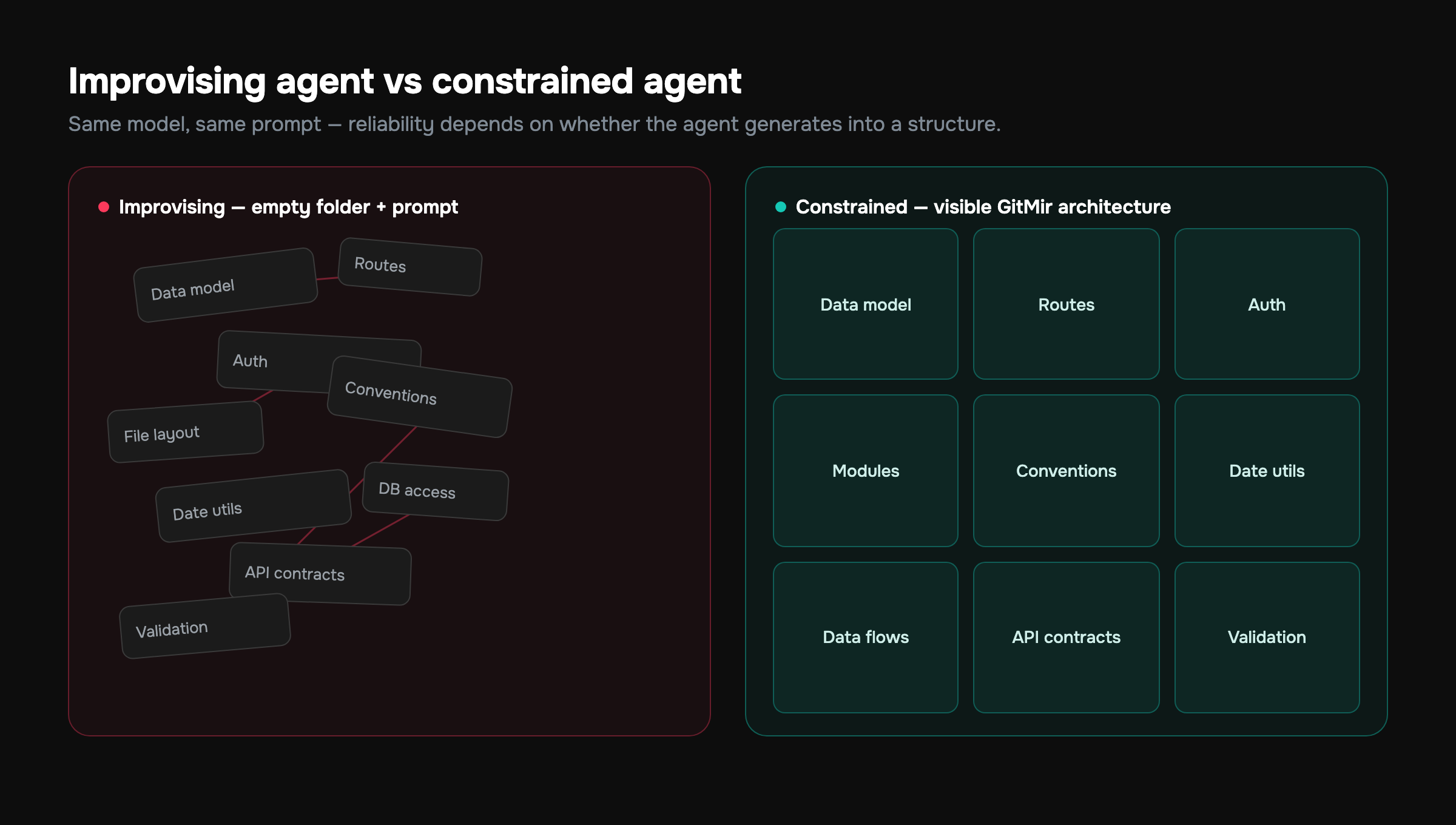
Here's the insight that reframes the entire help-vs-hurt question. An AI coding agent's reliability is not primarily a function of which model it runs. It's a function of how much structure the agent is forced to operate within.
Picture two extremes:
- Improvising agent: an empty folder and a prompt. The model invents the data model, the routes, the file layout, the conventions — all implicit, all undocumented, all forgotten the next session. Maximum freedom, maximum drift.
- Constrained agent: a defined architecture — modules, entities, data flows, API contracts — that the agent generates into. The shape already exists; the agent fills in implementations that fit it. Less freedom, dramatically less drift.
Same model, same prompt, wildly different reliability depending on which situation it's in. This is why "the agent got worse as the project grew" is such a common complaint. In the empty folder, every task was self-contained and verifiable. As the codebase grew, each task started depending on context the agent couldn't see — and the improvising agent began contradicting itself.
You don't make an agent reliable by giving it a smarter model. You make it reliable by giving it less room to guess.
A bigger context window and a better model push the wall back. They don't remove it. The structural fix is to stop asking the agent to hold your whole system in its head, and instead give it a system it can read.
How GitMir Constrains the Agent Instead of Trusting It
This is the approach GitMir takes, and it's worth being precise about what it does and doesn't claim. The idea is to flip the order of operations. Instead of prompt-first — describe a feature, let the agent emit files — you go architecture-first.
You model the product visually: the modules, the data flows, the APIs, the business logic. That visual architecture becomes the source of truth. When the AI generates, it produces structured, editable objects inside that architecture, not loose files dropped into a folder. Three consequences follow directly:
- The agent can't invent your data model, because the data model already exists as something it generates against rather than something it guesses at.
- Generation is validated before deploy — checked against the architecture you defined, so drift and broken contracts get caught structurally instead of in production.
- Components are reusable, so the agent reaches for the existing auth pattern or formatter instead of conjuring a fourth one it couldn't see.
There's a token consequence too. Because the architecture is explicit, the agent only needs the relevant slice of the model — not your whole codebase re-stuffed into context every turn. In practice that's where GitMir lands roughly 15x fewer LLM tokens than ad-hoc prompting for equivalent work: the agent isn't rediscovering your system on every task, because the system is already described. Fewer tokens means faster iterations, more deterministic output, and cost that doesn't explode as the project grows. You can model your own numbers with the ROI calculator.
None of this replaces the agent. It contains it. The model still does the generation. It just does it inside guardrails it can't talk its way past.
A Practical Framework for Using Agents Safely
You don't need to abandon agents to use them well. You need a policy. Before handing any task to an agent, score it on three axes.
- Blast radius — what breaks if it's wrong? A new isolated component: low. A change to your auth or billing flow: high. High blast radius means the agent works inside constraints and a human reviews intent, not syntax.
- Verifiability — can correctness be checked cheaply and automatically? If types, tests, and schema checks can prove it, let the agent iterate freely against those gates. If "correct" is a judgment call, keep a human in the loop.
- Visibility — can the agent see everything it needs? If the relevant context fits in the window or lives in a defined architecture, green light. If the task depends on tribal knowledge scattered across a large codebase, the agent will drift — give it structure first.
A simple decision rule that holds up in practice:
Let the agent move fast where mistakes are cheap and visible. Force it to move inside structure where mistakes are expensive or invisible. Never let it improvise where both are true at once.
This is also a fair lens for choosing tools. Copilot and Cursor optimize for the assistant-to-agent spectrum inside your existing repo — great leverage, you supply the discipline. Lovable, v0, and Replit Agent optimize for fast greenfield generation — magical early, drift-prone as the app grows. Bubble gives you a constrained visual model but locks you into its runtime. GitMir's bet is that you can have the visual constraint and keep real, editable code with validation before deploy. There's a fuller breakdown in our tool comparison and in the best AI coding tools of 2026.
What to Do This Week
If you're already using an AI coding agent — and per the survey data, you almost certainly are — the move isn't to use it more or less. It's to be deliberate about where.
- Audit your last month of agent-assisted work. Which tasks shipped clean? Which came back as bugs? The clean ones were bounded and verifiable. The bugs came from tasks where the agent couldn't see enough.
- Put a deterministic gate in front of every generation — types, tests, schema checks, security scans — so the cheap layer catches what the agent fabricates.
- For anything touching your data model, auth, or money, stop improvising. Give the agent an architecture to generate into so it can't invent the parts that matter most.
AI coding agents are the highest-leverage tool to arrive in software in a decade. They earn that leverage when they operate inside a system that constrains them, and they squander it when they're left to improvise in an empty folder. The teams that win the next few years won't be the ones with the best prompts. They'll be the ones whose agents had the least room to guess.
See how architecture-first generation works in practice on the product page, or put real numbers against your own token spend and engineering hours with the ROI calculator. If you're weighing options today, the GitMir IDE is free to start.
More on this, with the numbers behind it
What business logic is, and where it lives →Features, rules, customer paths and how they connect — why nothing a team already owns holds them in one place, and what that costs.GitMir Vibe →Your coding agent gets the rules and customer paths a task touches before it writes code, and each change is checked against them before it is committed.A week of engineering work, measured →The same workflows timed with the business logic established and without it — hours, not adjectives.GitMir Intelligence →Ask what a change reaches, what a rule holds and which customer path meets it — with the part of the product each answer came from.An architecture nobody wrote by hand →Areas, customer paths, rules and status flows of a real product, built from its source and published in full.Put a number on your own workflow
Bring us the recurring workflow where AI still needs expensive people to supervise, review and correct. We baseline what it costs and put the target in writing before we build. Or connect a repository and see it on your own code first — 10,000 credits free, no card.
Build My Business Case → Start free →Frequently asked questions
What is an AI coding agent?
An AI coding agent is software that takes a goal in plain language and works toward it semi-autonomously — reading your codebase, editing files, running commands, checking results, and looping until the task is done. Unlike autocomplete or chat assistants, an agent plans and executes multiple steps on its own, returning a working diff rather than a single suggestion you have to place.
What's the difference between an AI coding agent and GitHub Copilot autocomplete?
Autocomplete suggests the next line and waits for you; an AI coding agent plans multi-step work, edits multiple files, runs commands, and corrects its own course without per-step approval. Copilot now offers both modes. The agent gives you more leverage on bounded tasks but more risk, because it acts on your system before you review each individual step.
Are AI coding agents reliable enough for production code?
AI coding agents are reliable for bounded, verifiable tasks — scaffolding, refactors, test generation — where you can check correctness cheaply. They're risky for changes to your data model, auth, or billing, where they invent and drift. Reliability depends less on the model and more on whether the agent generates inside a constrained architecture with validation before deploy.
Where do AI coding agents fail most often?
AI coding agents fail most on unbounded tasks in large codebases they can't fully see. They confidently invent nonexistent APIs, drift from your architecture by reinventing code they didn't load into context, and silently break invariants — like changing a data shape two layers up — that pass casual review and the happy-path test, then fail in production.
How do I use AI coding agents safely?
Score every task on three axes before handing it to an agent: blast radius (what breaks if it's wrong), verifiability (can correctness be checked automatically), and visibility (can the agent see everything it needs). Let agents move fast where mistakes are cheap and visible; force them inside a defined architecture where mistakes are expensive or invisible.
Do AI coding agents reduce or increase technical debt?
It depends entirely on constraints. An improvising agent in an empty folder increases debt — research on AI-assisted code shows rising churn and duplication as velocity climbs. An agent generating into a defined architecture, with validation before deploy and reusable components, reduces it, because it can't invent the structural parts that create the worst debt.

Related articles
How to Validate AI-Generated Code Before It Ships
AI writes confident code that's sometimes wrong. A repeatable validation process catches the failures before production. Here's a practical checklist plus the system-level fix.
Replit Agent vs GitMir: Autonomy vs Control
Replit Agent builds and runs apps autonomously in the browser. GitMir gives you a visual system you direct and validate. Here's the trade-off and which fits you.

How to Benchmark AI Coding Tools on Your Own Repository
A practical protocol for testing AI code tools yourself: designing the question set, holding the model constant, blind scoring, and the four things worth measuring.