
GitHub Copilot Alternatives: Beyond Autocomplete
Copilot is excellent autocomplete — but autocomplete has a ceiling. Here are the alternatives for teams who need multi-file edits, agents, or full architectural control.
If you're hunting for GitHub Copilot alternatives, you've probably hit the same wall everyone does. Copilot is a brilliant autocomplete and a mediocre everything-else. It finishes your line before you do. It scaffolds a test in two seconds. Then you ask it to do something architecturally real — touch four files, respect a pattern you set up last month, not reinvent a utility that already exists — and it shrugs. That isn't a bug. Inline completion is the job Copilot was built for. The trouble is that the job most teams actually need done in 2026 moved past autocomplete a while ago.
So here's the short answer before the long one. The best GitHub Copilot alternative depends on which limitation pushed you out. Want a more aggressive agent inside your editor? That's Cursor. Want prompt-to-app speed for prototypes? Lovable, v0, or Replit Agent. Want no-code for internal tools? Bubble. And if your real problem is that AI keeps generating code faster than your team can keep the system coherent — the bottleneck nobody's autocomplete solves — then you have an architecture problem, and it needs an architecture-first tool like GitMir. Same underlying models. Very different leashes.
What follows is a founder-to-founder map of the alternatives: what each one is genuinely better at, where it quietly costs you, and how to match the tool to the failure mode you're actually trying to escape. I'll be fair to Copilot, fair to the competition, and honest about where each option (ours included) is the wrong call.
Why people look past Copilot in the first place
Copilot didn't lose anything. It's still the lowest-friction, lowest-risk AI assist that exists, native to VS Code, JetBrains, and Neovim, with a blast radius of exactly one suggestion. People leave it not because it got worse but because their problem changed.
The pattern is almost always the same. You adopt Copilot when your bottleneck is typing, and it crushes that. Then the codebase grows. A few more engineers join. AI starts writing a larger and larger share of the lines, and your bottleneck silently shifts from "writing code" to "keeping the code coherent." Copilot has no model of your system. It sees the open file and a slice of retrieved context, and it will cheerfully reimplement a function that already lives three folders away — because it doesn't know the folder exists.
Controlling how much AI writes — a few lines at a time — feels like control. It isn't. It's the architecture that decides whether your codebase is an asset or a liability, and autocomplete is structurally blind to architecture.
There's a second, quieter reason: trust. Research from McKinsey found that generative AI delivers its biggest gains on routine, well-scoped coding work and far smaller ones on complex, high-context tasks — where output still needs heavy human oversight to be trustworthy. That's the whole story of the Copilot-alternatives market in one finding. Adoption is solved; developers already use AI everywhere. Trust at the level of real, multi-file, system-shaped work is not. Every tool below is a different bet on closing that gap.
The framework: where does the tool let you say "no"?
Before naming alternatives, you need one lens, or you'll compare feature lists and pick wrong. Here it is: at what moment does a human get to reject the AI's work, and how much do you have to verify by hand to trust it?
- Copilot lets you say no at the keystroke. Cheap to undo, but the AI never helps with the expensive part — keeping a growing system coherent.
- Agentic IDEs (Cursor) let you say no at the diff. Far more leverage, far more to review. The verification surface grows with the power.
- Prompt-to-app tools (Lovable, v0, Replit Agent) barely let you say no at all. You get a running thing fast; steering it later is the hard part.
- **Architecture-first tools (GitMir) let you say no before generation.** You define the structure, and AI is constrained to generate inside it, validated before deploy.
Hold that lens through everything below. It's the only one that survives contact with a real, scaling codebase. (We go deeper on it in Cursor vs Copilot vs GitMir if you want the head-to-head.)
The GitHub Copilot alternatives, by the problem they solve
Here's the honest map. Don't pick by brand; pick by the failure mode that pushed you here.
| Alternative | Best for | Control point | Where it bites |
|---|---|---|---|
| Cursor | Engineers who want an aggressive in-editor agent | The diff you approve | Verification debt — the sixth 400-line diff gets a skim, not a review |
| Lovable / v0 | Fast UI and frontend prototypes | The prompt | Opaque output that's hard to steer as it grows |
| Replit Agent | Zero-setup full-app generation | The prompt | Same prototype-to-production cliff, plus a hosted environment to escape |
| Bubble | No-code internal tools and MVPs | Visual builder | Platform lock-in; you're not generating portable code |
| Codeium / Windsurf / Tabnine | Free or self-hosted inline assist | The keystroke | Same architectural blindness as Copilot |
| GitMir | Teams who need AI inside an architecture they control | Before generation | Wrong tool for pure inline autocomplete or throwaway demos |
Now the detail on each.
Cursor: a more powerful version of the same bet
Cursor is the alternative most ex-Copilot engineers reach for first, and for good reason. It's a full AI-native editor (a VS Code fork) whose agent plans multi-file changes, runs commands, reads your codebase, and hands you a diff. Where Copilot finishes a line, Cursor refactors a feature. If your complaint about Copilot was "it won't do enough," Cursor is the direct upgrade.
The trade is real, and it's the trade from our framework: Cursor moves the control point from the keystroke to the diff, which gives you more leverage and more to verify. Generation got 10x more powerful. Your ability to trust the output did not. A skilled engineer reviewing every diff catches the problems. A tired one at 5pm approving the fourth large diff of the day does not. Cursor is excellent for real engineers who will actually read what the agent produced. It is not a way to skip the reading.
Pick Cursor when you have engineering discipline and want maximum agentic power in a familiar editor. Be wary when the people driving it can't reliably review what it generates — that's exactly when verification debt turns into the kind of technical debt nobody can see. We wrote a fuller breakdown in Cursor alternatives for when even Cursor isn't the fit.
Lovable, v0, and Replit Agent: prompt-to-app speed
These three live at the maximum-speed end of the axis. You type a sentence, you get a running application. v0 (from Vercel) is the strongest at polished React UI from a prompt. Lovable generates fuller web apps with backend wiring. Replit Agent builds and hosts an entire app in a zero-setup environment — genuinely magical for going from idea to clickable demo before lunch.
The catch is identical across all three. The output is opaque, and it gets harder to steer as it grows. They're phenomenal for the first 80% of a prototype and increasingly painful for the part where a prototype becomes a product real users and real money depend on. That isn't a knock; they're prototyping tools doing prototyping well. The expensive mistake is letting the prototype quietly become the product without anyone deciding to.
The dangerous moment with any prompt-to-app tool isn't when it fails. It's when it succeeds just well enough that you ship the demo, get users, and inherit a codebase no human ever architected and no human fully understands.
Pick these when stakes are low and speed is everything: throwaway demos, UI exploration, validating an idea before you've hired an engineer. Outgrow them the moment the thing has to be maintained.
Bubble: the no-code alternative
If your reason for leaving Copilot is "honestly I don't want to write code at all," Bubble is the serious no-code answer. It's a mature visual builder for web apps, strong for internal tools, marketplaces, and MVPs you need live without an engineering team. You assemble logic and data visually instead of generating text.
The trade is platform lock-in and a ceiling. You're not producing portable code; you're producing a Bubble app that runs on Bubble. For internal tooling and early MVPs that's often a fine trade. For a product you intend to own and scale technically, it becomes the thing you eventually rebuild.
Codeium, Windsurf, and Tabnine: the free and self-hosted lane
If your reason for leaving is purely price or data residency, the closest alternatives are other inline assistants. Codeium (and its Windsurf editor) offers a strong free tier and aggressive agentic features. Tabnine leans into self-hosting and privacy for enterprises that can't send code to a third party. These are legitimate answers to "I want what Copilot does, but free / on-prem / cheaper."
Be clear-eyed, though. They share Copilot's core limitation. They're autocomplete-shaped tools with autocomplete-shaped blindness to your architecture. Switching from one inline assistant to another solves a billing or compliance problem. It does not solve the coherence problem, and the coherence problem is the one that compounds.
The alternative that isn't another autocomplete: architecture-first AI
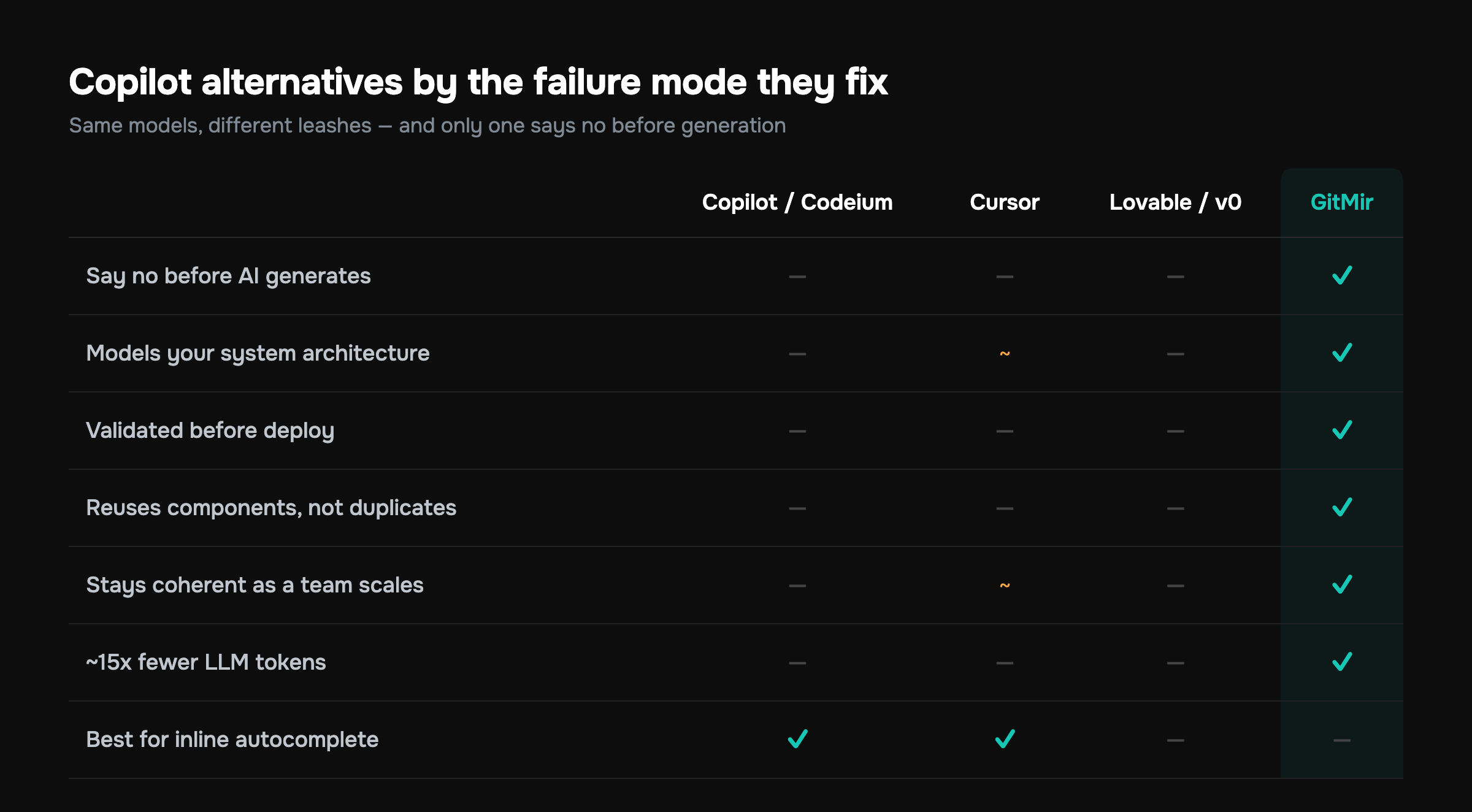
Every tool above answers "how do I get AI to write code?" GitMir answers a different question: "how do I get AI to write code that stays coherent without me policing every diff?" That's the failure mode autocomplete created, and no autocomplete can fix it.
The mechanism is straightforward. Instead of spraying generated text into a repo and hoping it coheres, you model the product first — visual architecture: modules, data flows, APIs, business logic. Then AI generates structured, editable objects inside that architecture, and the output is validated before it deploys. You're not reviewing freeform diffs hoping nothing drifted. The structure is the guardrail, so there's far less to audit after.
Three consequences that matter to a founder:
- The control point moves earlier. You constrain the AI before it generates, not after. Less verification debt, fewer surprises in the diff, less of the architectural drift that makes a codebase slowly unmaintainable.
- Reusable components instead of duplication. Because generation happens inside a modeled system, AI builds on what exists rather than reinventing it three folders over — the exact thing Copilot, Cursor, and the prompt-to-app tools all fail to prevent.
- Roughly 15x fewer LLM tokens than ad-hoc prompting. When the model generates into a defined structure instead of re-deriving context from scratch every prompt, you stop paying for the same context over and over. That's a real line item — see how the token math works out and what it does to your bill.
Autocomplete makes a developer faster at producing lines. Architecture-first makes a team faster at producing software — because the bottleneck at scale was never typing speed. It was keeping a system you can still reason about while five people and an AI all write into it at once.
Let me be fair to you and to us. GitMir is the wrong tool if you want pure inline autocomplete in an existing 200k-line monorepo, or if you're throwing together a demo you'll delete Friday. For the first, stay on Copilot. For the second, use a prompt-to-app tool. GitMir earns its keep when the software has to last and a team has to maintain it — when "ship fast" and "stay in control" both have to be true at once. You can see exactly how it works on the product page and how it stacks up on the comparison page.
A realistic decision walkthrough
Forget the matrix for a second. Here's how the choice actually plays out, by who you are.
You're a solo engineer in a mature codebase. Your bottleneck is typing and small refactors. Honestly? Keep Copilot, or move to Cursor if you want a stronger agent and you'll review the diffs. You don't have a coherence problem yet, because there's one brain holding the whole system. The autocomplete-shaped tools fit.
You're a non-technical founder validating an idea. Use Lovable, v0, or Replit Agent. Get the demo in front of users this week. Just write yourself a note: the day this gets traction, it stops being a prototype, and the tool that built it is not the tool that scales it.
You're a small team where AI now writes most of the code. This is the danger zone, and it's why most people read articles about Copilot alternatives in the first place. Generation is no longer your problem; coherence is. Every engineer plus the AI is writing into the same system, nobody can review everything, and drift accumulates where you can't see it. This is precisely where an architecture-first approach pays for itself — the structure does the policing your review process can't scale to. Run your numbers on the ROI calculator before you decide; the cleanup cost you're avoiding is usually the biggest number on the page.
You're an enterprise with compliance constraints. Tabnine or a self-hosted option may be table stakes for data residency. But solve compliance and coherence as two problems. A self-hosted autocomplete still can't keep your architecture coherent, and at enterprise scale that's the more expensive of the two.
The trap to avoid
The most expensive mistake in this whole category isn't picking a "bad" tool. It's picking a high-speed, low-control tool for work that needed structure, then discovering the cost only after the prototype became the product. Speed tools cash out as cleanup bills. Control tools cost a little more upfront and don't. Match the tool to the stakes, not to the demo.
Free GitHub Copilot alternatives, honestly assessed
People search for "free GitHub Copilot alternatives" constantly, so let's be direct. The genuinely free or freemium options are Codeium/Windsurf (the strongest free tier with agentic features), and to a lesser degree Tabnine's free plan. They'll give you inline completion at no cost.
But "free" answers a price question, and price is rarely the real reason teams outgrow Copilot. If the autocomplete itself was the limitation, a free autocomplete inherits the same limitation. The cost that actually hurts isn't the $10/month subscription. It's the engineering months spent untangling code that AI generated fast and incoherently. A free tool that lets you accumulate that debt faster is not a bargain.
Copilot alternatives for teams and enterprise
For team and enterprise buyers, the selection criteria shift from "best suggestions" to four things that determine whether AI is a net asset:
- Coherence at scale — does the tool keep the system reasonable as more people and more AI write into it? (Autocomplete: no. Architecture-first: that's the entire point.)
- Reviewability — how much human verification does trusting the output require, and does that requirement scale with your headcount? (Diff-based tools quietly fail here.)
- Cost predictability — token spend and the hidden cost of cleanup. Ad-hoc prompting is the most expensive way to use an LLM; structured generation cuts the token bill roughly 15x and the cleanup bill more than that.
- Onboarding — can a new engineer understand what the AI built? A visual architecture is legible in a way a wall of generated diffs is not.
This is where the Copilot-alternatives conversation stops being about autocomplete and starts being about how your organization keeps software coherent while AI writes more of it every quarter. Our full landscape view is in the best AI coding tools of 2026 if you want the panoramic version.
So which alternative should you actually pick?
Strip it down to one decision:
- Want a better autocomplete or agent in your editor? Cursor (powerful, you review the diffs) or, for free/on-prem, Codeium/Tabnine. Same bet as Copilot, bigger or cheaper.
- Want speed for a prototype? Lovable, v0, or Replit Agent — and a calendar reminder that the prototype is not the product.
- Want no-code for internal tools? Bubble.
- Want AI to build software that stays coherent as a team and an AI write into it together? That's the architecture-first lane, and it's the one autocomplete can't reach by design. That's GitMir.
The market specialized for a reason. There's no single winner, only a right tool for the failure mode you're escaping. Copilot was built for a world where the bottleneck was typing. If that's still your world, stay. But if your bottleneck moved to keeping a growing system coherent while AI writes most of it — and for most teams in 2026 it has — then the answer isn't a faster autocomplete. It's a different shape of tool entirely.
Not sure which side of that line you're on? The fastest way to find out is the numbers. Run your codebase through the ROI calculator to see what AI-generated incoherence is actually costing you, then look at how architecture-first generation works and decide whether the bottleneck you're fighting is one a better autocomplete can fix — or one it never could. And when you're ready to try it, the GitMir IDE is free to start.
More on this, with the numbers behind it
What business logic is, and where it lives →Features, rules, customer paths and how they connect — why nothing a team already owns holds them in one place, and what that costs.Every tool in this market, side by side →What each one is built for, and the line between assembling context and holding it.GitMir Vibe →Your coding agent gets the rules and customer paths a task touches before it writes code, and each change is checked against them before it is committed.Where your source code stays →Three deployment modes, and exactly what crosses which boundary in each one.Ask a published model your own question →A real product, read in full. Ask it what a change reaches and check the answer against the source it came from.Put a number on your own workflow
Bring us the recurring workflow where AI still needs expensive people to supervise, review and correct. We baseline what it costs and put the target in writing before we build. Or connect a repository and see it on your own code first — 10,000 credits free, no card.
Build My Business Case → Start free →Frequently asked questions
What is the best GitHub Copilot alternative?
There's no single best one — it depends on which Copilot limitation pushed you out. For a stronger in-editor agent, choose Cursor. For prototype speed, choose Lovable, v0, or Replit Agent. For free inline assist, Codeium. For AI that stays coherent as a team scales, an architecture-first tool like GitMir solves the problem autocomplete can't.
Is there a free alternative to GitHub Copilot?
Yes. Codeium (and its Windsurf editor) offers the strongest free tier with agentic features, and Tabnine has a free plan plus self-hosting for privacy. But "free" only answers a price question — these share Copilot's architectural blindness, so a free autocomplete inherits the same limitation that made you leave in the first place.
Is Cursor better than GitHub Copilot?
Cursor is more powerful but not strictly better — it's a different trade. Copilot controls the AI at the keystroke, meaning a tiny blast radius and minimal help. Cursor controls it at the diff, meaning multi-file agentic edits, far more leverage, and far more to verify. Cursor wins for disciplined engineers who actually review every diff; Copilot wins for low-risk inline assist.
What is better than GitHub Copilot for a team?
For teams, the better tool is whichever keeps your codebase coherent as more people and AI write into it — not whichever has the best suggestions. Autocomplete tools like Copilot and Codeium are architecturally blind. Architecture-first platforms like GitMir constrain AI to generate inside a modeled system, validated before deploy, which scales review in a way diff-by-diff tools cannot.
Why look beyond autocomplete tools like Copilot?
Because autocomplete solves the wrong bottleneck at scale. Copilot speeds up typing, but once AI writes most of your code, the real problem becomes keeping the system coherent — and autocomplete has no model of your architecture. Industry research consistently finds that developers see AI tools handle complex, high-context tasks badly, which is exactly this gap.
Can GitHub Copilot alternatives reduce AI token costs?
Yes, dramatically, if they change how AI is prompted. Ad-hoc prompting re-derives context on every call, which is the most expensive way to use an LLM. Generating into a defined architecture instead — as GitMir does — cuts token usage roughly 15x because the structure carries the context, so you stop paying repeatedly for the same information.

Related articles

Cursor Alternatives: 6 Options for Teams Who Need Control
Cursor is a great AI editor, but it's not the only — or always the right — choice. Here are six alternatives, what each is best at, and when you need more than an editor.
Cursor vs Copilot vs GitMir: Which AI Coding Tool Keeps You in Control?
Cursor and Copilot make you faster at writing code. GitMir makes your whole system visible and controllable. Here's how they compare — and when you need more than autocomplete.

Lovable vs GitMir: AI App Builder vs AI-Native System
Lovable generates apps from prompts, fast. GitMir gives you a visual, controllable system for complex products. Here's how they differ and which fits your project.