
Cursor vs Copilot vs GitMir: Which AI Coding Tool Keeps You in Control?
Cursor and Copilot make you faster at writing code. GitMir makes your whole system visible and controllable. Here's how they compare — and when you need more than autocomplete.
If you're comparing Cursor vs Copilot to decide which AI coding tool keeps you in control, here's the answer before the 3,000 words: none of them, by default. Both are exceptional at generating code. Both are structurally indifferent to whether that code coheres into a system you can still reason about six months from now. Copilot keeps you "in control" at the keystroke, where every suggestion is one rejection away from gone. Cursor keeps you in control at the diff, where you review what its agent produced. Neither keeps you in control at the level that actually matters once a codebase grows: the architecture. That gap is the whole story, and it's what decides which tool you should actually pick.
So the honest framing of "Cursor vs Copilot vs GitMir" isn't "which writes better code." By 2026 they all write code that compiles and usually runs. The real question is where each tool puts the control point, and how much you have to verify by hand to trust the output. Copilot puts control at the keystroke: smallest blast radius, smallest help. Cursor puts it at the diff: more power, more to review. GitMir moves it earlier. You model the system first, and AI generates structured objects inside that architecture, validated before deploy. Same AI, different leash.
What follows is a founder-to-founder breakdown of all three: where each one genuinely wins, where it quietly costs you, and which one matches the problem you actually have. I'll be specific, I'll be fair to the competition, and I'll tell you plainly where GitMir is the wrong call too.
The real question isn't quality — it's the control point
Most "best AI coding tool" debates go sideways because people argue about suggestion quality. That stopped being the bottleneck a while ago. The frontier models behind Cursor, Copilot, and every serious tool are good enough that the code usually works. What separates these tools is how they fail, and who absorbs the cost when they do.
Think of "control" as a single question: at what moment does a human get to say no?
- Copilot says no at the keystroke. You accept or reject a few lines. Cheap to undo, but it means the AI never helps with the expensive part — keeping a growing system coherent.
- Cursor says no at the diff. The agent plans a multi-file change and hands you a diff to approve. Far more leverage. But verification doesn't scale the way generation does, and the sixth 400-line diff of the afternoon gets a skim, not a review.
- **GitMir says no before generation.** You define the architecture — modules, data flows, APIs, business logic — and the AI is constrained to generate editable objects inside it. The control point moves earlier, so there's less to audit after.
The trap in every AI coding tool comparison: the more powerful the generator, the bigger the verification surface it hands back to you. Speed of generation is solved. Speed of trusting the output is the actual constraint — and that's an architecture problem, not a model problem.
Hold that lens through the rest of this. It's the only one that survives contact with a real, scaling codebase.
GitHub Copilot: maximum safety, minimum leverage
Copilot is the conservative default, and it earned that. It's native to VS Code and JetBrains, the latency is invisible, and its blast radius is exactly one suggestion. For a huge amount of day-to-day work — boilerplate, test scaffolds, finishing a line you already see in your head — nothing else has lower friction. If your bottleneck is typing speed, Copilot is genuinely hard to beat.
Where Copilot keeps you in control
- Smallest possible blast radius. A bad suggestion costs you one keystroke. You're never staring at a 500-line change wondering what it touched.
- Stays in your editor and your flow. No context switch, no new surface to learn, no agent to babysit.
- Predictable. It autocompletes. It doesn't go off and rewrite four files while you're getting coffee.
Where control quietly leaks
The same thing that makes Copilot safe makes it nearly useless on the problem that actually hurts at scale: it has no model of your system. It sees the open file and some retrieved context, and that's it. It will cheerfully reimplement a utility you already wrote three folders away, because it doesn't know the folder exists. Architectural drift — duplicated logic, inconsistent patterns, abstractions that should have been shared — is completely invisible to it. Copilot will help a junior team build a tangle at full speed and never once flag it.
Copilot controls how much the AI writes — a few lines at a time. That feels like control. But controlling line count is not the same as controlling architecture, and it's the architecture that decides whether your codebase is an asset or a liability.
Pick Copilot when your work is incremental and you mostly need a faster keyboard, or when you want the most defensible, lowest-risk AI assist for a team that isn't ready to manage an agent. Outgrow it when your bottleneck shifts from "typing" to "keeping the system coherent." At that point it stops being the tool and becomes the thing you've outgrown. If that's you, the GitHub Copilot alternatives breakdown maps where teams actually go next.
Cursor: real agentic power, real verification debt
Cursor is the tool most teams reach for when Copilot stops being enough. It's a full agentic IDE: it reads your repo, plans multi-file edits, runs commands, and ships diffs at a speed no human can match. When people say AI "10x'd" their throughput, they're usually describing a Cursor-shaped workflow. The leverage is real, and it isn't subtle.
Where Cursor keeps you in control
- You review before it lands. Every agent run produces a diff you approve. In principle, nothing ships you didn't see.
- It reasons across your codebase. Unlike Copilot, Cursor can pull in related files, follow references, and make a coherent change across several of them at once.
- You can scope it. Good prompts, rules files, and targeted context keep the agent on a leash — when you invest in them.
Where control quietly leaks
Cursor's control point is the diff, and diffs don't scale the way generation does. Generating a 400-line change takes the agent thirty seconds. Reviewing it properly takes you twenty minutes: reading every line, checking it didn't duplicate logic, confirming it respected boundaries you never wrote down. Do that six times in an afternoon and the math breaks. The sixth diff gets a skim. The review feels like control. Functionally, you've started rubber-stamping.
And like Copilot, Cursor has no model of your system. It edits files brilliantly. It does not understand your architecture. So the failure mode is specific and expensive. The agent reimplements something that already exists, drifts the pattern in module C away from modules A and B, and none of it is visible in any single diff. It's only visible across the whole system, which is exactly the view the tool doesn't have.
Cursor doesn't have a generation problem. It has a verification problem. Any tool that just generates more, faster, makes that problem worse — not better. The fix isn't a better agent; it's shrinking what you have to verify, or moving the verification earlier.
Pick Cursor when you have senior engineers who can absorb review at the diff level and you want maximum agentic horsepower inside a real IDE. Be careful when your team is junior or moving fast, because Cursor makes a senior engineer faster and a sloppy team messier in exactly the same number of keystrokes. If your gripe is review fatigue or architectural drift specifically, the Cursor alternatives guide groups the options by which kind of control you're missing.
The data: why "fast generation" isn't free
This isn't a vibe. The cost of generating faster than you can keep things coherent is now measurable. Research from McKinsey on generative AI in software development found that while AI tools can sharply accelerate the production of new code, those speed gains erode without disciplined review and refactoring, and that teams which lean on raw generation tend to accumulate quality and maintainability debt rather than retire it. In plain terms: AI assistants make teams add and copy far more, and consolidate far less.
That is the Cursor-and-Copilot failure mode quantified. Both tools are optimized to generate the next chunk of code. Neither is optimized to notice that the chunk already exists somewhere, or that the codebase is fragmenting. So the tools that just generate more, faster, push exactly the metric the research flags: more copy-paste, less refactoring, more code revised within two weeks of being written because it wasn't right the first time.
The lesson for tool selection is direct. A faster generator without a structural memory of your system is a debt machine. The way out isn't to generate less. It's to give the AI a model of the system to generate into, so "this already exists" and "this belongs in that module" are constraints, not afterthoughts.
GitMir: move the control point before generation
GitMir starts from a different premise. Instead of pointing AI at a repo and reviewing what comes back, you first model the product as visual architecture — modules, data flows, APIs, business logic — and the AI generates structured, editable objects inside that architecture. The control point moves from "after generation" (diff review) to "before generation" (the model the AI is allowed to build within).
That one move changes the economics of trust.
Where GitMir keeps you in control
- AI generates inside a system you defined. It can't reimplement a module that already exists in the model, because the model is the source of truth it builds from — not a folder it has to rediscover.
- Validation happens before deploy. Generated objects are checked against the architecture you defined, so structural mistakes are caught at the model level instead of surfacing in production at 2 a.m.
- Reusable components, not copy-paste. Logic lives as objects you reference, which is the structural opposite of the duplication researchers have measured.
- You can see the system. "Visual architecture" isn't decoration. It means the whole-system view that Cursor and Copilot lack is the default view. Drift is visible because the structure is visible.
- Up to ~15x fewer LLM tokens than ad-hoc prompting, because you're generating into a defined structure instead of re-shipping context and re-explaining the system on every prompt. Chaos is what's expensive. Structure is what's cheap.
Where GitMir is the wrong call — honestly
- You want a raw IDE for an existing, idiosyncratic codebase. If your work is surgical edits inside a large legacy repo with its own conventions, an agentic IDE like Cursor is the more natural fit.
- You only need autocomplete. If your real bottleneck is typing speed on incremental work, Copilot is lighter and you don't need an architecture-first platform.
- You want zero structure, maximum speed, throwaway prototype today. If the thing genuinely won't outlive the week, modeling it first is overhead. Use a generator and move on.
GitMir's bet is that most software does outlive the week, and the moment it does, the cost of "we generated fast and now nobody understands the system" dwarfs the cost of modeling it up front. See how the pieces fit together on the product page, and how the tradeoffs land against specific tools on the comparison page.
Side-by-side: Cursor vs Copilot vs GitMir
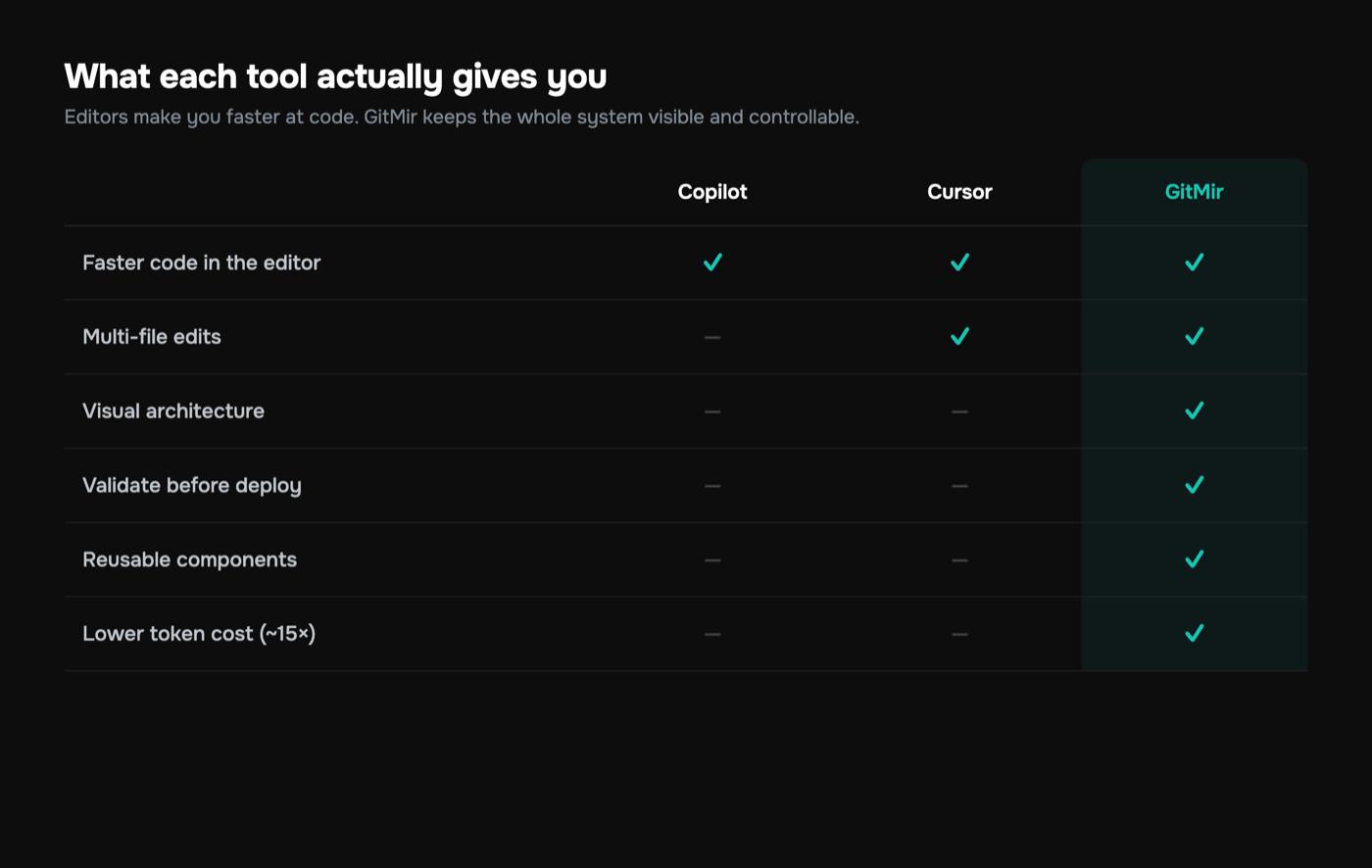
A clean structured breakdown of the three, on the axes that actually decide the call:
| Dimension | GitHub Copilot | Cursor | GitMir |
|---|---|---|---|
| Control point | Keystroke | Diff | Architecture (before generation) |
| Blast radius | One suggestion | One multi-file diff | Constrained to the model |
| Model of your system | None | None (edits files) | Yes — visual architecture is the source of truth |
| Verification burden | Tiny, constant | Large, scales with diff size | Structural, checked before deploy |
| Best at | Inline autocomplete | Agentic multi-file edits | Building a coherent system with AI |
| Failure mode | Reinvents existing code silently | Architectural drift across diffs | Overhead on genuine throwaways |
| Token economics | Opaque, re-ships context | Heavy under sustained agent use | ~15x fewer tokens via structured generation |
| Who it makes faster | Anyone, a little | Seniors a lot, juniors riskily | Teams who want to scale without losing the thread |
Read the table by the row that hurts you most. If "reinvents existing code silently" is your pain, Copilot is the cause, not the cure. If "architectural drift across diffs" is keeping you up, more agent power deepens it. And if neither tool can answer "show me the whole system," that's the row GitMir exists for.
A realistic scenario: three founders, same feature
Make it concrete. Three small teams each need to ship the same thing: a billing module with usage metering, an invoices API, and a customer-facing dashboard.
The Copilot team moves line by line. A senior dev scaffolds the metering logic with fast autocomplete, writes the API by hand with Copilot finishing each function, and builds the dashboard the same way. It works. It also quietly grows three slightly different ways of formatting currency and two near-identical "get current usage" helpers, because Copilot never knew the first one existed. Six weeks later a rounding bug lives in two places and gets fixed in one.
The Cursor team moves in bursts. They prompt the agent: "build a billing module with usage metering and an invoices API." Thirty seconds later, a 600-line diff. It's mostly right. Reviewing it properly would take an hour they don't have, so they skim, accept, and ship. The dashboard arrives as a second big diff. Two weeks later, a chunk of that code is being revised — exactly the early-churn pattern the research flagged — because the metering edge cases weren't actually handled, just plausibly written. The velocity was real. So was the cleanup.
The GitMir team models first. Billing module, metering data flow, invoices API, dashboard, all defined as architecture before a line is generated. The AI fills in the objects inside that structure. The "get current usage" logic exists once, as a referenced component, because the model wouldn't let it exist twice. Validation catches a missing constraint on the metering flow before deploy, not after. They were slightly slower to the first demo and meaningfully faster to a system the next engineer can actually read. That difference compounds, and it shows up directly in the ROI math.
None of these teams is "wrong." They optimized for different things. The point is that the tool chose the tradeoff for them, and most teams never realize that's what a tool selection is.
How to actually choose
Skip the feature checklist. Diagnose your real constraint, then pick:
- "My bottleneck is typing speed on incremental work." Copilot. Don't overthink it; you don't need an agent or an architecture layer.
- "I have senior engineers and want maximum agentic horsepower in an IDE." Cursor (or a close agentic peer like Windsurf). Just budget honestly for review time and accept the verification debt.
- "My team is moving fast and I'm scared of what the codebase becomes." That's an architecture-control problem, and neither autocomplete nor a faster agent fixes it. That's GitMir's lane.
- "I need a non-engineer to ship an app or a UI fast." Different category entirely — Lovable, v0, Replit Agent, or Bubble. Great for zero-to-one, weaker as the codebase matures into something real.
- "Token bills are out of control." The cause is chaos, not volume. Structured generation — fewer, smaller, system-aware calls — is the lever. Ad-hoc prompting in any IDE re-ships context endlessly.
The most expensive mistake in this whole category is trading a slow tool for a fast mess. "Faster" only helps if the thing getting faster is the thing that's actually stuck. For most scaling teams, the stuck thing isn't generation — it's keeping the system coherent while it generates.
You can mix these, too. Plenty of teams keep Copilot for inline work, reach for an agent on isolated tasks, and use an architecture-first platform for the core system that has to last. The mistake is using a keystroke tool or a diff tool for a job that's fundamentally about architecture, then blaming the AI when the system fragments. For the full field, the best AI coding tools of 2026 rundown puts every option on the same map.
The bottom line
Cursor and Copilot are both excellent at what they're built for, and both leave you holding the same bag: they generate, you verify, and verification doesn't scale. Copilot keeps the verification small by keeping the help small. Cursor makes the help enormous and the verification right along with it. Neither has a model of your system, which is why industry research can measure the industry-wide rise in duplication and drop in refactoring. The tools are optimized to add, not to keep coherent.
"Which AI coding tool keeps you in control" comes down to where you want to say no. If you want to say no at the keystroke, Copilot. At the diff, Cursor. Before generation, at the architecture — so there's dramatically less to verify, logic isn't duplicated, and the whole system stays visible — that's the case for moving the control point earlier with GitMir.
If you're trying to put a number on what that earlier control point is worth for your team, start with the ROI calculator. It translates review time, rework, and token spend into a figure you can actually defend. Or just see the product and watch what "AI inside an architecture you defined" looks like in practice. The right tool isn't the fastest generator. It's the one that keeps you in control of what your system is allowed to become, and that's a decision worth making on purpose. Compare the options head to head on the comparison page or start free.
More on this, with the numbers behind it
What business logic is, and where it lives →Features, rules, customer paths and how they connect — why nothing a team already owns holds them in one place, and what that costs.Every tool in this market, side by side →What each one is built for, and the line between assembling context and holding it.GitMir Vibe →Your coding agent gets the rules and customer paths a task touches before it writes code, and each change is checked against them before it is committed.GitMir Intelligence →Ask what a change reaches, what a rule holds and which customer path meets it — with the part of the product each answer came from.An architecture nobody wrote by hand →Areas, customer paths, rules and status flows of a real product, built from its source and published in full.Put a number on your own workflow
Bring us the recurring workflow where AI still needs expensive people to supervise, review and correct. We baseline what it costs and put the target in writing before we build. Or connect a repository and see it on your own code first — 10,000 credits free, no card.
Build My Business Case → Start free →Frequently asked questions
Is Cursor or GitHub Copilot better for keeping control of AI-generated code?
It depends on where you want control. Copilot keeps it at the keystroke — tiny blast radius, but no help with architecture. Cursor keeps it at the diff — far more power, but verification scales poorly. Neither models your system, so both let architectural drift and duplicated logic accumulate invisibly as the codebase grows past the demo stage.
What is the main difference between Cursor and GitHub Copilot?
The main difference is leverage versus safety. Copilot is an inline autocomplete with a one-keystroke blast radius — predictable, low-risk, limited to incremental help. Cursor is a full agentic IDE that plans and executes multi-file edits, giving far more power in exchange for far larger diffs to review. Same models underneath; very different control surfaces and failure modes.
How is GitMir different from Cursor and Copilot?
GitMir moves the control point before generation instead of after. You model the system as visual architecture first, then AI generates structured, editable objects inside it, validated before deploy. Cursor and Copilot generate into a repo and hand you code to verify; GitMir constrains the AI to a system you defined, which prevents duplication and keeps the whole architecture visible.
Does using AI coding tools actually hurt code quality?
It can, when generation outpaces coherence. Studies of AI-assisted codebases spanning over 200 million changed lines found duplicated code blocks rose roughly eightfold during the AI-assistant era while refactoring dropped sharply. The tools aren't the problem; the absence of a system model is. AI that generates into defined architecture avoids the copy-paste and churn that unstructured prompting produces.
Which AI coding tool is best for a fast-moving startup team?
For incremental work, Copilot is the lowest-friction choice. For senior teams wanting agentic horsepower, Cursor wins — if you budget for review time. But if your fear is what the codebase becomes as you move fast, that's an architecture-control problem neither solves; GitMir's model-first approach is built for scaling without losing the thread.
Can I use Cursor, Copilot, and GitMir together?
Yes, and many teams do. Keep Copilot for inline autocomplete, reach for Cursor on isolated agentic tasks, and use GitMir's architecture-first approach for the core system that has to last. The mistake is using a keystroke or diff tool for a job that's fundamentally about architecture, then blaming the AI when the system fragments.

Related articles
Cursor Alternatives: 6 Options for Teams Who Need Control
Cursor is a great AI editor, but it's not the only — or always the right — choice. Here are six alternatives, what each is best at, and when you need more than an editor.
GitHub Copilot Alternatives: Beyond Autocomplete
Copilot is excellent autocomplete — but autocomplete has a ceiling. Here are the alternatives for teams who need multi-file edits, agents, or full architectural control.

Lovable vs GitMir: AI App Builder vs AI-Native System
Lovable generates apps from prompts, fast. GitMir gives you a visual, controllable system for complex products. Here's how they differ and which fits your project.