
Cursor Alternatives: 6 Options for Teams Who Need Control
Cursor is a great AI editor, but it's not the only — or always the right — choice. Here are six alternatives, what each is best at, and when you need more than an editor.
If you're hunting for a Cursor alternative, the real question isn't "which editor has better autocomplete." It's which tool gives your team control over what the AI actually ships. Cursor generates code fast inside a familiar VS Code shell, and it's good at it. But speed without structure is how teams end up with a codebase nobody fully understands: duplicated logic, half-finished refactors, a growing pile of AI-written functions that pass review only because review got lazy.
The best Cursor alternatives fall into three camps. There are near-identical IDE copilots (GitHub Copilot, Windsurf) competing on suggestion quality. There are prompt-to-app generators (Lovable, v0, Replit Agent, Bubble) that trade fine-grained control for raw output speed. And there's a third category: visual, architecture-first platforms like GitMir that put the AI inside a system you actually model, so generated code lands as structured, editable objects instead of free text dumped into files.
This guide walks through six options, who each one is for, and the trade-offs that matter when you're a founder or eng lead who has to live with the output for the next three years. Short version: if you want raw velocity, stay close to Cursor or Copilot. If you want velocity and an architecture you can reason about, you need a different shape of tool entirely.
Why teams go looking for a Cursor alternative
Cursor earned its reputation honestly. It's a fast, polished fork of VS Code with strong multi-file editing, a good agent mode, and Tab completion that genuinely saves keystrokes. For solo developers and small teams shipping fast, it's hard to beat.
The friction shows up at scale. Three patterns drive most teams to look for Cursor alternatives:
- No shared architecture. Cursor operates on files. It has no model of your product — your modules, data flows, APIs, and business logic exist only as scattered text. Every engineer prompts in their own dialect, and the AI has no canonical structure to generate into.
- Cost at volume. Token spend scales with how much context you stuff into each prompt. Re-explaining the same architecture across dozens of prompts a day, per engineer, adds up fast — and you're paying to re-derive context the tool should already know.
- Review fatigue. AI generates faster than humans can meaningfully review. When everything is a diff in a file, the only validation is a human reading carefully, and humans stop reading carefully around the fortieth PR.
The trap isn't that AI writes bad code. It's that AI writes plausible code faster than your team can verify it — and plausible-but-wrong is more expensive than obviously-broken.
That's the lens for the rest of this comparison. Output speed is table stakes now. The differentiator is what happens after generation: can you see the structure, validate it, and reuse it?
The 6 best Cursor alternatives at a glance
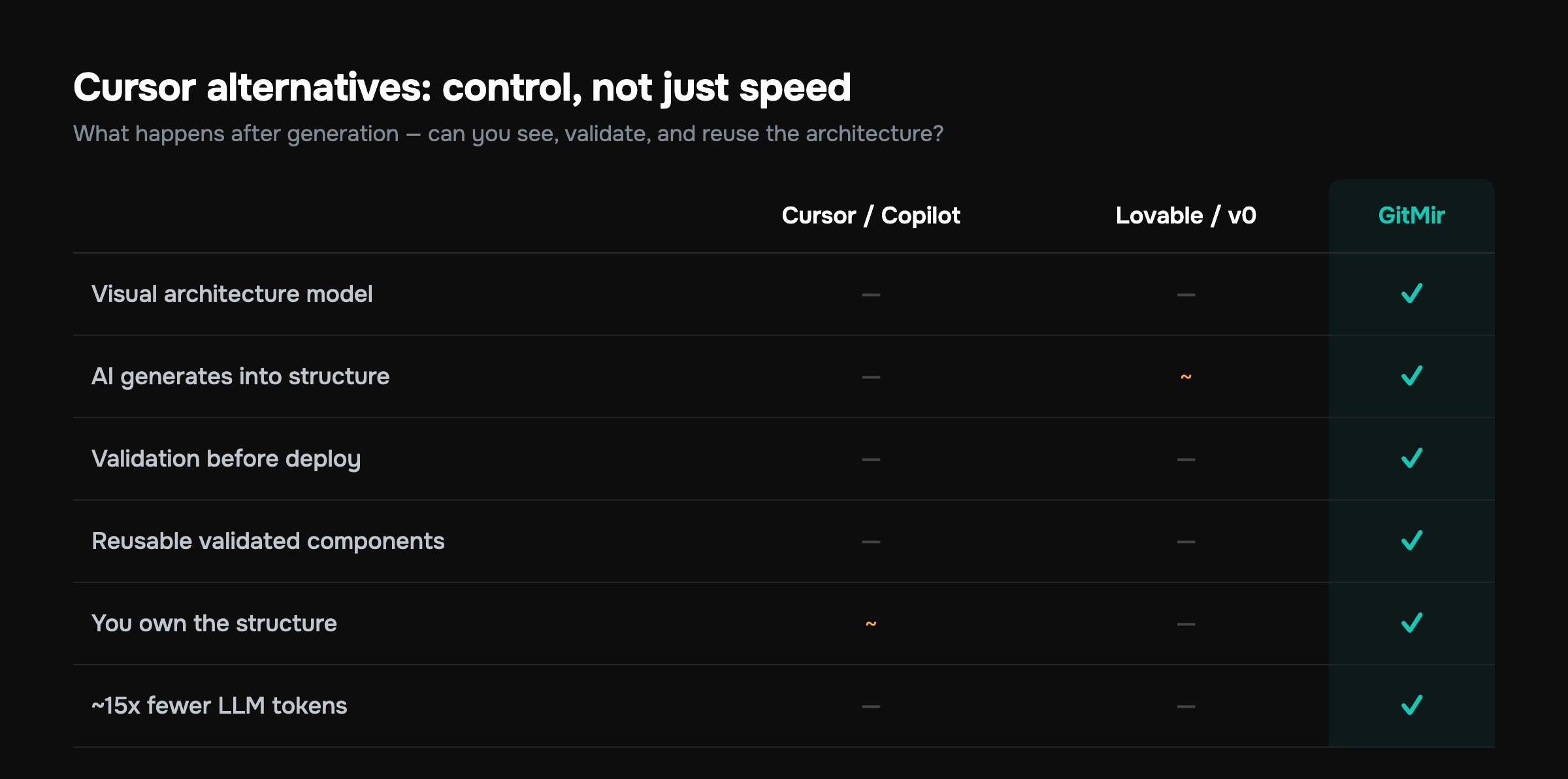
Here's the structured breakdown before we go deep. "Control" here means one thing: can you see and constrain the architecture the AI builds, not just the code it types?
| Tool | Category | Best for | Control level | Trade-off |
|---|---|---|---|---|
| GitHub Copilot | IDE copilot | Teams already in VS Code / GitHub | Low–medium | Great suggestions, no architecture model |
| Windsurf | Agentic IDE | Devs wanting deeper agent flows | Medium | Similar ceiling to Cursor |
| Lovable | Prompt-to-app | Founders shipping a web MVP fast | Low | You don't own the structure |
| v0 by Vercel | UI generator | Frontend / React component work | Low–medium | UI-focused, not full systems |
| Replit Agent | Cloud build agent | Prototypes, learning, fast demos | Low | Hard to graduate to production |
| GitMir | Visual architecture | Teams who need control + reuse | High | You model the product first |
Now the detail.
1. GitHub Copilot — the safe default
GitHub Copilot is the most direct Cursor alternative for teams that don't want to leave their existing editor. It runs inside VS Code, JetBrains, Neovim, and Visual Studio, plugs straight into GitHub's review and PR flow, and its enterprise tier handles SSO, policy controls, and the data-handling guarantees procurement teams ask about.
Where it wins:
- Zero migration cost if your team already lives in VS Code and GitHub.
- Chat, inline completion, and an agent mode that have matured significantly.
- Org-level governance — content exclusions, audit logs, the boring stuff that matters at 50+ engineers.
Where it's identical to Cursor: Copilot is still file-centric. It autocompletes and chats against your repo, but it carries no canonical model of your system. It will happily suggest a fourth slightly-different way to validate an email address, because it doesn't know the other three exist. If you're weighing the two head-to-head, we broke that down in Cursor vs Copilot vs GitMir, and there's a broader field guide in GitHub Copilot alternatives.
Pick Copilot if you want the lowest-friction, most-supported assistant and you're comfortable that architecture stays a human responsibility. At small team sizes, that's a perfectly reasonable bet.
2. Windsurf — agentic editing, familiar shape
Windsurf (formerly Codeium) is the closest spiritual cousin to Cursor: a dedicated AI-first editor with a strong agent ("Cascade") that plans and executes multi-step changes across a codebase. If Cursor's agent mode is the feature you actually use, Windsurf is the most natural lateral move.
Its strengths are real. The agent reasons well about multi-file context, the flow state of accepting and steering changes is smooth, and it indexes large repos competently. Teams that found Cursor's agent slightly too eager sometimes prefer Windsurf's pacing.
But it shares Cursor's ceiling. It's still operating on files and diffs. No visual architecture, no concept of reusable validated components, no place where "this is how our payment module is shaped" lives as a first-class object. You get a better agent, not a different category. For a team whose core problem is velocity within a known structure, that's enough. For a team whose problem is the structure itself is eroding, it isn't.
3. Lovable — prompt-to-app for founders
Lovable belongs to a different category than Cursor: it's a prompt-to-app builder. You describe the app in natural language, it generates a working full-stack web app — frontend, backend, database wiring — and you iterate by chatting. For a non-technical or semi-technical founder who needs a functioning MVP this week, it's genuinely impressive.
The trade-off is ownership of structure. Lovable optimizes for "does it run and look right," not "is this a system I can hand to four engineers in eight months." You can export the code, sure, but what you export is generated artifact, not architecture you authored. The same applies to its peers in this lane:
- v0 by Vercel — superb at React/Next.js UI generation from a prompt or screenshot. Best-in-class for components and pages; not designed to be your whole system of record. (More in our best AI coding tools 2026 roundup.)
- Bubble — the mature no-code app builder. Great for internal tools and marketplaces if you can live entirely inside its runtime; the moment you need to leave the platform, you're rewriting.
Prompt-to-app tools answer "can I get an app?" Architecture-first tools answer "can I get the app — the one my team can extend, audit, and still understand a year from now?"
None of these are wrong choices. They're the right choice for a validation sprint and the wrong choice for a system you intend to scale. Know which one you're doing.
4. v0 by Vercel — when the bottleneck is UI
If your team's actual constraint is frontend velocity — turning designs into clean React components — v0 is the sharpest tool in this list for that one job. It generates accessible, idiomatic components, plays well with Tailwind and shadcn/ui, and slots into a Next.js workflow without ceremony.
It's listed separately from the prompt-to-app group because its honesty is its strength. v0 doesn't pretend to be your backend or your architecture. It does UI, and it does UI well. Used as a component factory feeding a system you control elsewhere, it's excellent. Use it as the foundation for a whole product and you'll hit the same "where does the structure live?" wall as every other generator.
5. Replit Agent — fastest path to a running demo
Replit Agent builds and runs an app in the cloud from a prompt, with the environment, hosting, and database provisioned for you. For prototypes, hackathons, teaching, and "I need something clickable by Friday," nothing is faster — there's no local setup at all.
The catch is the graduation problem. Replit is optimized for getting to a running thing, not for the long tail of maintaining a production system with a team, CI, and compliance requirements. Plenty of teams prototype on Replit Agent and then rebuild properly elsewhere. That's a perfectly rational use of it, as long as you budget for the rebuild rather than discovering it.
6. GitMir — the architecture-first alternative
Here's the category Cursor, Copilot, and Windsurf don't occupy. GitMir treats AI-assisted development as a visual system rather than a faster way to type code. Instead of prompting a file, you model the product first — modules, data flows, APIs, business logic — and the AI generates structured, editable objects inside that architecture.
That one structural difference changes the four things teams actually struggle with:
- You can see the system. Architecture is a visual model, not an emergent property of 800 files. New engineers onboard against a map, not an archaeology dig.
- **AI generates into structure, not into a void.** Because the model defines where things go, output lands as editable objects in the right place — not free text the AI guessed the location of.
- Validation happens before deploy. Generated objects are checked against the architecture you defined, so "plausible but wrong" gets caught by the system, not just by a tired reviewer on PR forty.
- Reusable components are first-class. Define a validated component once and reuse it, instead of the AI re-deriving a slightly different version each time — the exact pattern that bloats codebases.
There's a hard cost angle too. Because the architecture already carries the context, you stop re-explaining your system in every prompt. GitMir reports up to ~15x fewer LLM tokens than ad-hoc prompting for comparable work. At team scale that's not a rounding error — it's the difference between an AI budget and an AI problem. You can model your own numbers on the ROI calculator.
GitMir isn't the right pick if you want to stay in your text editor and treat AI as autocomplete. It asks you to model the product first. The payoff: the AI builds with you inside a system you control, instead of for you in a pile you inherit. See the full picture on the product page or line it up against the field on the comparison page.
The cost most comparisons skip: code that erodes
Velocity comparisons usually stop at "how fast does it generate." The number that should scare you is what happens to code quality over time when generation outpaces structure.
According to the Google DORA State of DevOps research, which surveys tens of thousands of technology practitioners worldwide, adopting AI assistance tends to lift individual throughput while putting downward pressure on software delivery stability — faster generation can quietly erode the qualities that keep a codebase shippable. The research frames AI as an amplifier: it magnifies the strengths of teams with strong structure and the weaknesses of teams without it. And the takeaway cuts deep. Assistants make it trivial to insert a new block and far less likely to reuse an existing one, so without a system that knows the existing structure, duplication and rework climb rather than fall.
That's the whole argument for control in one finding. The tools that generate code into files — Cursor, Copilot, Windsurf, the prompt-to-app builders — are exactly the conditions under which duplication and churn explode, because nothing in the workflow knows the existing structure well enough to reuse it. An architecture-first tool that makes components reusable by default is attacking the precise mechanism the research identifies.
How to actually choose
Match the tool to the problem you're solving this quarter, not the demo you saw on Twitter.
- You want a better autocomplete and you live in VS Code. Stay close to Cursor — pick Copilot for governance and ecosystem, or Windsurf for a stronger agent. Architecture stays your job.
- You're a founder validating an idea this week. Use Lovable or Replit Agent, ship the MVP, and explicitly budget for a rebuild if it gets traction.
- Your bottleneck is specifically frontend/UI. Use v0 as a component factory feeding a system you control elsewhere.
- You're building an internal tool and never leaving the platform. Bubble is fine — just understand the lock-in you're accepting.
- You need AI velocity AND an architecture your team can reason about, audit, and reuse. That's the GitMir case — model the product, let AI build inside it, validate before deploy.
Ask one question of any AI dev tool: "In eighteen months, will my team understand the system this produced — or will they be reverse-engineering it?" The answer sorts these six tools faster than any feature table.
A quick gut-check on team size, too. Solo or two-person teams can absorb a messy codebase because everyone holds it in their head. That breaks somewhere around five to ten engineers, when "the person who wrote it" stops being available for every question. If you're at or approaching that size, the control dimension stops being a nice-to-have and becomes the thing that decides whether you keep shipping or grind to a halt under your own output.
The bottom line
Cursor is a great editor. The reason to seek a Cursor alternative is almost never "the completions aren't good enough." It's "I've lost the thread of what we're building." Copilot and Windsurf give you a marginally different version of the same fast-typing experience. The prompt-to-app tools — Lovable, v0, Replit Agent, Bubble — trade control for speed, which is the right deal for a validation sprint and the wrong deal for a system you'll scale.
If control is the thing you're missing, the answer is a different category of tool: one where AI builds inside an architecture you can see, validate, and reuse — not one where it generates into files and hopes for the best.
The fastest way to know whether that's worth it for your team is to put a number on it. Run your team size and AI spend through the ROI calculator to see what reusable components and ~15x fewer tokens actually save you, then see how GitMir works on a real architecture. Or skip ahead and start free. Start with the math; the rest follows from there.
More on this, with the numbers behind it
What business logic is, and where it lives →Features, rules, customer paths and how they connect — why nothing a team already owns holds them in one place, and what that costs.Every tool in this market, side by side →What each one is built for, and the line between assembling context and holding it.A week of engineering work, measured →The same workflows timed with the business logic established and without it — hours, not adjectives.GitMir Intelligence →Ask what a change reaches, what a rule holds and which customer path meets it — with the part of the product each answer came from.Ask a published model your own question →A real product, read in full. Ask it what a change reaches and check the answer against the source it came from.Put a number on your own workflow
Bring us the recurring workflow where AI still needs expensive people to supervise, review and correct. We baseline what it costs and put the target in writing before we build. Or connect a repository and see it on your own code first — 10,000 credits free, no card.
Build My Business Case → Start free →Frequently asked questions
What is the best alternative to Cursor for teams?
For teams that need control over architecture, GitMir is the strongest alternative because AI generates structured, validated objects inside a visual system you model first. For teams wanting a familiar editor with strong governance, GitHub Copilot is the safest default. The right pick depends on whether your bottleneck is typing speed or structural control.
Is GitHub Copilot better than Cursor?
Neither is strictly better — they're close competitors. Copilot wins on ecosystem, enterprise governance, and zero migration cost if you already use VS Code and GitHub. Cursor often feels faster for multi-file agent edits. Both are file-centric and lack a real architecture model, so the choice usually comes down to your existing stack and review process.
What are free alternatives to Cursor?
GitHub Copilot offers a free tier with limited completions, and Windsurf (formerly Codeium) has long provided a generous free plan for individual developers. Replit Agent and v0 offer free usage with caps. For commercial team use, factor in seat pricing and, critically, token costs at volume — the recurring expense most free-tier comparisons quietly omit.
Can AI coding tools replace developers?
No — they change what developers do rather than replace them. Research consistently shows AI accelerates code generation while increasing duplication and churn, meaning developers spend more time on review, validation, and architecture. The teams that win treat AI as a force multiplier inside a controlled system, not an autonomous replacement, keeping humans responsible for structure and correctness.
Why is AI-generated code lower quality?
AI code quality drops mainly because assistants insert new code far more readily than they reuse existing code, driving duplication and rework. Studies of AI-assisted codebases have found copy-pasted code roughly quadrupled and surpassed refactored code by 2024. The fix is structural: tools that make components reusable and validate output against a defined architecture before deploy directly counter this erosion.
How do I reduce AI coding token costs?
The biggest lever is to stop re-explaining your architecture in every prompt. Tools that carry system context structurally — rather than requiring you to paste it repeatedly — cut token usage dramatically; GitMir reports up to ~15x fewer tokens than ad-hoc prompting. Also reuse validated components instead of regenerating them, and scope prompts tightly to the change at hand.

Related articles
GitHub Copilot Alternatives: Beyond Autocomplete
Copilot is excellent autocomplete — but autocomplete has a ceiling. Here are the alternatives for teams who need multi-file edits, agents, or full architectural control.

Cursor vs Copilot vs GitMir: Which AI Coding Tool Keeps You in Control?
Cursor and Copilot make you faster at writing code. GitMir makes your whole system visible and controllable. Here's how they compare — and when you need more than autocomplete.

Lovable vs GitMir: AI App Builder vs AI-Native System
Lovable generates apps from prompts, fast. GitMir gives you a visual, controllable system for complex products. Here's how they differ and which fits your project.